Advanced Search
The Advanced Search feature allows you to search for a converter using a number of search criteria which describe the physical characteristics of a converter.
• You can use up to 23 criteria to search for converters.
• Make & Model are the most common criteria used.
• You can use a serial number or part thereof in conjunction with the other search criteria if you cannot find the converter in the converter search section.
As each criteria is selected, the possible number of units is shown at the top of the page.
Once the number of units is less than 500, the Submit button appears.
To access Advanced Search :
1. Select Converter Search from the main menu.
2. The Converter Search screen appears.
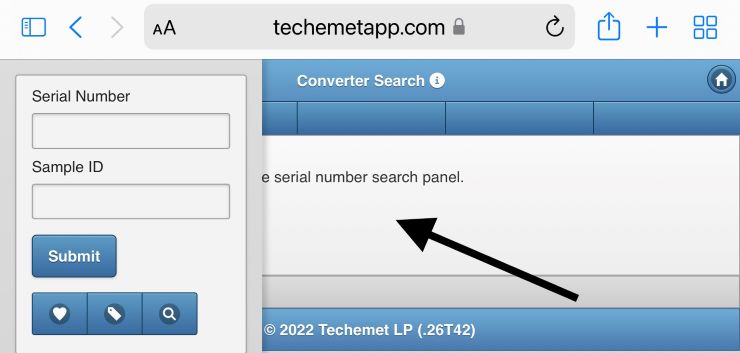
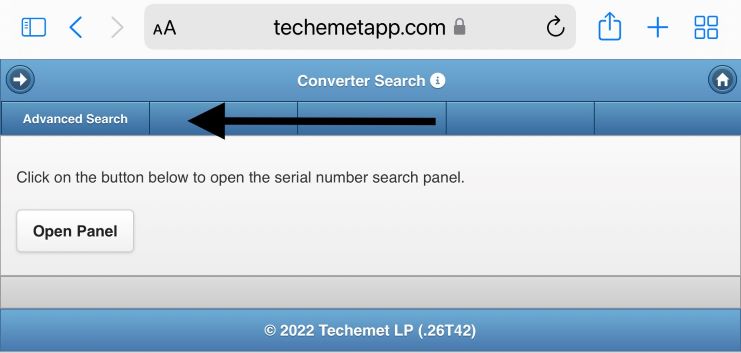
3. Tap on the screen to access the Advanced Search tab.
4. Select the Advanced Search tab.
5. The Advanced Search page appears.
Fields on the Advanced Search page
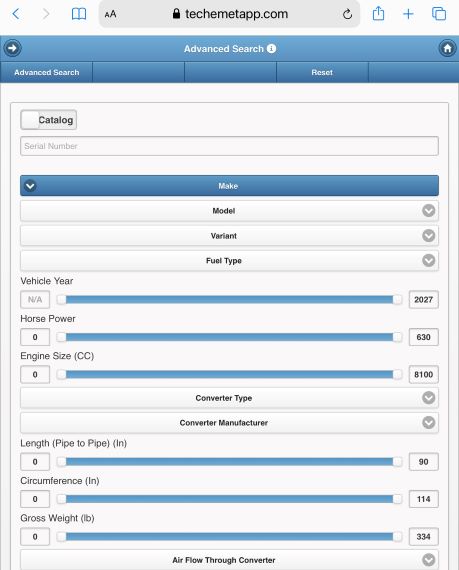
1. The first search criteria field defaults to catalog.
2. Serial Number field - Type in the full or partial serial number (if you have one).
3. Make – select the make of the vehicle from the drop-down menu.
4. Model – select the model of the vehicle from the drop-down menu.
5. Variant – select the variant from the drop-down menu, if applicable. Please note that you cannot select a variant until you have previously selected a car make & model.
6. Fuel Type - Select the Fuel Type from the drop-down menu
7. Vehicle Year – Select the year or range by moving the toggles.
8. Horse Power – Select the Horse Power or range by moving the toggles.
9. Engine Size (CC) – Select the Engine Size or range by moving the toggles.
10. Converter Type – Select the Converter Type from the drop-down menu.
11. Converter Manufacturer – Select the Converter Manufacturer from the drop-down menu.
12. Length (Pipe to Pipe) (In) - Select the length or range by moving the toggles.
13. Circumference (In) - Select the Circumference or range by moving the toggles.
14. Gross Weight (lb) - Select the Gross Weight or range by moving the toggles. This is the weight after the exhaust pipe has been cut off.
15. Air Flow Through Converter - Select the Air Flow Through Converter from the drop-down menu.
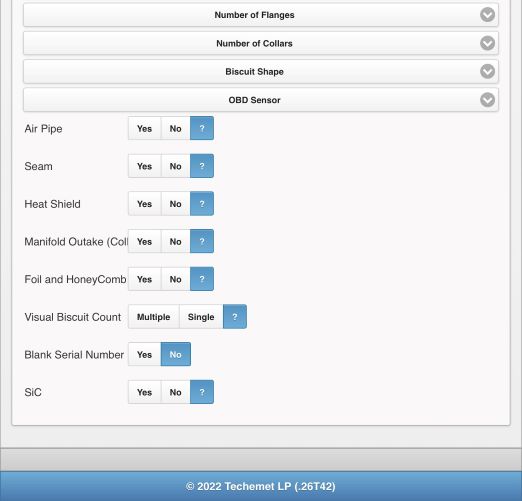
16. Number of Flanges - Select the Number of Flanges from the drop-down menu.
17. Number of Collars – Select the Number of Collars from the drop-down menu.
18. Biscuit Shape - Select the Biscuit Shape from the drop-down menu.
19. OBD Sensor – Select the OBD Sensor from the drop-down menu.
20. Air Pipe, Seam, Heat Shield, Manifold Outtake (Collector), Foil and HoneyComb, – indicate Yes or No in these fields.
21. Visual Biscuit Count – Indicate Multiple or Single.
22. Blank Serial Number – select yes or no.
23. SiC – This field refers to silicone carbide, which is only found in diesel units. Select yes or no.
How To Search For Converters
Once all the search criteria have been selected AND the search result is less than 500 units:
• Tap Submit on the top right hand side of the page.
• The converters that match the criteria entered appear.

Scroll through until you see a converter that most closely matches the converter you are searching for.
Tap the $ sign to get the value of the converter.
In the above example, the value of the converter is $141.00.
Click here for information on SiC Pricing.
Advanced Search Customization
It is possible to change the order of the search criteria and/or remove some search criteria to make the Advanced search screen more stream-lined. This can be done under User Settings.
For information on this, refer to the User Settings help file under Help.